
How to Play Roblox Online Without Downloading – Complete 2026 Guide
Updated: October 2026 | Reading time: 7 minutes
Thank you for reading this post, don't forget to subscribe!Want to play Roblox online without downloading a game client or installing extra software? You’re not alone. Whether you’re using a Chromebook, an older laptop, or a computer with limited storage, playing Roblox directly through a web browser sounds like the perfect solution.
The good news is that browser-based Roblox gaming is evolving. Cloud gaming services have offered ways to stream Roblox without a local installation, and Roblox has announced plans to introduce its own web player.
However, not every website advertising “Roblox online free” actually provides a working, legitimate version of the game.
In this guide, we’ll explain how to play Roblox online in 2026, which methods are available, what you should know about cloud gaming, and how to avoid misleading websites.
Can You Play Roblox Online Without Downloading?
Yes, browser-based Roblox gameplay is possible through supported streaming services, and official browser gameplay is planned for 2026. However, availability depends on the service, device, and rollout status.
Traditionally, Roblox has required players to install its official application on Windows, macOS, Android, or iOS.
For example, visiting Roblox.com on a Windows computer allows you to explore thousands of experiences, customize your avatar, and manage your account. But launching an experience normally requires Roblox Player.
That distinction is important: accessing the Roblox website through Chrome is not the same as running the game entirely inside Chrome.
In September 2026, Roblox announced a major change. Its upcoming web player is intended to let users launch supported experiences directly from their browsers without installing the application.
Roblox expects to introduce this capability by the end of 2026, beginning with Google Chrome.
Until the feature becomes available to you, the official Roblox application remains the most reliable option.
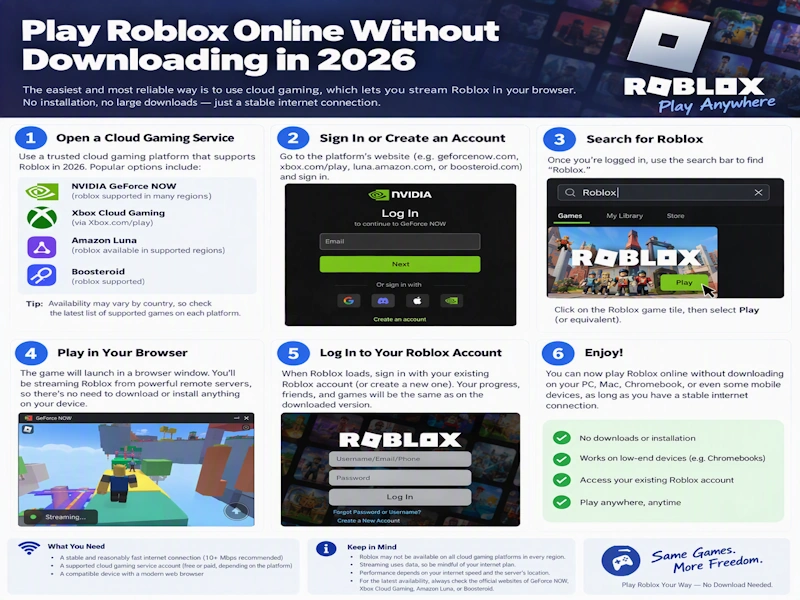
Method 1: Play Roblox Using the Official Roblox Website
The safest starting point is Roblox’s official website.
Step 1: Visit Roblox.com
Open Google Chrome, Microsoft Edge, Firefox, or another supported browser and navigate to:
Step 2: Sign In or Create an Account
If you’re new to Roblox, register for a free account. Existing players can sign in with their usual credentials.
Never share your password or verification codes with third-party gaming websites.
Step 3: Explore Roblox Experiences
Use the search feature to discover games across different genres, including:
- Adventure and exploration
- Obstacle courses, commonly called obbies
- Role-playing and simulation
- Racing and driving
- Survival and horror
- Multiplayer competitions
Step 4: Launch Your Game
Select an experience and click the Play button.
On most desktop setups, Roblox will open the installed Roblox Player or prompt you to install it.
If Roblox’s upcoming web player is available for your browser and the selected experience, you may instead receive an option to launch directly online.
Important: As of October 2026, the announced official web player should not be assumed to be available to everyone.
Method 2: Play Roblox Through Cloud Gaming
Cloud gaming offers another approach to playing games without installing them locally.
Instead of running a game on your computer, a remote server handles the processing and streams the gameplay to your browser.
Your keyboard and mouse inputs are sent to that server, allowing you to interact with the game remotely.
What About Roblox on now.gg?
Now.gg is a cloud gaming platform known for providing browser access to supported mobile games.
In the past, now.gg published instructions for playing Roblox directly through its cloud platform.
However, reports from August 2026 indicate that its former Roblox game page redirected to the now.gg homepage, making the old method unreliable.
Therefore, Roblox availability on now.gg should be verified directly rather than assumed.
If Roblox becomes available again through an authorized cloud gaming service, the general process would be:
- Visit the cloud gaming provider’s official website.
- Search its available game library for Roblox.
- Check whether a browser-play option is offered.
- Launch the game if the service supports it.
- Follow the provider’s official authentication instructions.
Avoid services that promise unrestricted Roblox access but request unusual downloads, payment information, or account credentials outside legitimate authentication systems.
Benefits of Cloud Gaming
When a compatible service is available, cloud gaming can provide several advantages:
Less local storage: The game runs on a remote server rather than requiring a full local installation.
Compatibility with modest hardware: Older computers may be able to stream games they cannot run themselves efficiently.
Convenient access: Supported games can launch from a browser without traditional installation.
Device flexibility: Some platforms support Windows, macOS, Chromebooks, and mobile devices.
The biggest drawback is internet dependency. Cloud gaming generally requires a stable connection, and input delay can affect fast-paced experiences.
Method 3: Play Roblox on a Chromebook
Chromebooks are popular among students and casual users, but their software compatibility differs from traditional Windows laptops.
If you’re trying to play Roblox on a Chromebook, you have two main possibilities.
Option A: Install Roblox Through Google Play
On compatible Chromebooks, Roblox can be installed using the Google Play Store.
Here’s how:
- Open your Chromebook’s Settings.
- Check whether Google Play Store support is enabled.
- Open Google Play.
- Search for the official Roblox application.
- Install Roblox and sign in.
This method requires a download, but it provides an official way to play on supported devices.
Option B: Use Browser-Based Gaming
If an authorized cloud gaming provider offers Roblox, you may be able to stream it through Chrome.
Roblox’s planned official web player could eventually provide another option.
Keep in mind that school-managed Chromebooks may restrict gaming websites, installations, or account access. Follow your school’s device and network policies.
Method 4: Play Roblox on a Low-End PC
You don’t necessarily need an expensive gaming computer to enjoy Roblox.
Many experiences are designed to work on modest hardware, although performance varies considerably depending on the game’s graphics, scripting, and number of players.
If Roblox runs slowly on your PC, try these improvements.
Lower Your Graphics Settings
Open the Roblox in-game menu and find the graphics settings.
Switch graphics quality to manual, then reduce it until the gameplay feels smoother.
Close Unnecessary Programs
Web browsers with many tabs, background applications, and software updates can consume valuable memory and processing power.
Closing unnecessary applications may improve performance.
Update Your Graphics Drivers
Outdated graphics drivers can cause crashes, rendering issues, or poor performance.
Use the official website of your graphics hardware manufacturer to find appropriate updates.
Choose Less Demanding Experiences
Not every Roblox experience requires the same computing power.
Simple obstacle courses, lightweight puzzle games, and smaller multiplayer experiences may perform better than graphically intensive worlds.
Roblox Online vs. Installed Roblox: Which Is Better?
| Feature | Browser or cloud gaming | Installed Roblox |
|---|---|---|
| Local installation | May not be required | Required |
| Storage usage | Usually lower | Requires local storage |
| Internet connection | Essential | Essential for online play |
| Graphics performance | Depends on service and connection | Depends on your device |
| Input delay | Can be affected by streaming | Generally avoids cloud-streaming delay |
| Availability | Limited by provider or rollout | Broad official support |
For most players, the installed version currently provides the most dependable experience.
Browser-based access is particularly interesting for people using shared computers, devices with limited storage, or supported cloud gaming services.
Is It Safe to Play Roblox Online for Free?
Roblox is free to access, although some experiences and virtual items involve optional purchases using Robux.
Unfortunately, Roblox’s popularity also attracts fake websites promising free Robux, unauthorized downloads, or instant browser access.
Before using a website that claims to offer Roblox without installation, consider these precautions:
- Use official Roblox links whenever possible.
- Avoid websites asking you to download unfamiliar executable files.
- Never enter your Roblox password into an untrusted form.
- Enable two-step verification for your account.
- Be skeptical of unlimited Robux generators.
- Check whether the service actually provides Roblox or merely redirects to advertisements.
A legitimate gaming service should clearly explain what it offers and how account authentication works.
What to Do If Roblox Won’t Launch
Even with a supported device, Roblox can sometimes refuse to start.
Here are a few common problems and possible solutions.
Roblox Keeps Asking You to Install the Player
This is normal when using the traditional desktop launch method without Roblox Player installed.
Download the official application from Roblox rather than searching for modified versions.
Roblox Opens but Immediately Closes
Restart your computer, update your operating system, and check whether security software is interfering with Roblox.
If necessary, reinstall Roblox using its official installer.
Roblox Is Lagging
Reduce graphics settings, close background applications, and check your internet connection.
If you’re streaming through a cloud gaming service, network latency may be the main cause.
Roblox Won’t Connect to a Game
Connection problems can result from unstable internet access, firewall restrictions, or temporary Roblox service interruptions.
You can check Roblox Status to see whether Roblox is experiencing an outage.
Best Types of Roblox Games to Try Online
Once you’re ready to play, choosing the right experience can make a big difference.
Obstacle Courses
Roblox obbies challenge players to jump across platforms, avoid hazards, and complete increasingly difficult levels.
They’re especially appealing to players who enjoy quick challenges and precision-based gameplay.
Racing Games
Racing experiences let players compete against friends, explore driving environments, and test different vehicles.
Some emphasize realistic driving, while others focus on arcade-style fun.
Role-Playing Games
Role-playing experiences allow players to explore virtual communities, create stories, and interact with other users.
These games can be particularly enjoyable with friends.
Survival and Horror Games
Survival experiences challenge players to escape dangerous situations, solve puzzles, or cooperate with teammates.
Horror games often combine exploration, suspense, and multiplayer teamwork.
Puzzle and Adventure Games
If you prefer thoughtful challenges, Roblox also features experiences built around exploration, logic, and problem-solving.
Looking for More Free Browser Games?
If you’re interested in games that launch directly in your browser, Roblox isn’t your only option.
At CrazyGames.cc, you can explore a variety of free online games across different genres, including action, racing, puzzles, and casual adventures.
Browser games can be a convenient alternative when you want quick entertainment without installing a large gaming application.
Explore the games available on CrazyGames.cc and discover something new to play.
Frequently Asked Questions
Can I play Roblox online without downloading anything?
Potentially, yes. Supported cloud gaming services can stream games without local installation, and Roblox has announced plans for an official browser player. However, access to Roblox through either method depends on current availability.
Can I play Roblox directly in Google Chrome?
You can browse Roblox’s website using Chrome. Traditionally, playing experiences on Windows or macOS requires Roblox Player. Roblox has announced a Chrome-based web player planned for late 2026.
Is Roblox free to play online?
Yes. Roblox accounts and many experiences are free to access. Optional purchases, including Robux and paid content, may cost money.
Can I play Roblox without downloading it on a Chromebook?
A compatible cloud gaming service may offer browser access. Otherwise, supported Chromebooks can use the official Roblox Android application through Google Play.
Does now.gg still support Roblox?
Now.gg previously promoted browser-based Roblox gameplay, but reports in August 2026 indicated that the old Roblox page was no longer providing the advertised access. Check the provider’s current catalog before relying on it.
Can I play Roblox on an old laptop?
Possibly. Performance depends on your operating system, hardware, and the experience you choose. Reducing graphics quality may help, while cloud gaming can be an alternative when supported.
Is playing Roblox through a browser safe?
Official Roblox services and reputable, authorized gaming providers are generally safer choices. Avoid unofficial websites that request passwords, offer suspicious downloads, or promise free Robux.
Final Thoughts: Playing Roblox Online in 2026
The idea of playing Roblox instantly, without waiting for installations or updates, is becoming more realistic.
Cloud gaming has demonstrated how games can run remotely and stream to a browser. Meanwhile, Roblox’s own announcement of an upcoming web player signals an important step toward easier access.
For now, the official Roblox application remains the most dependable choice for most players. Browser-based options are worth exploring, but their availability should always be checked.
And if you’re simply looking for fun games that you can launch quickly, explore the growing selection of free online browser games at CrazyGames.cc.
This article is an independent gaming guide. CrazyGames.cc is not affiliated with or endorsed by Roblox Corporation.




Leave a Reply