

Barbie Unicorn Dress-Up Game Online: Create Magical Looks Safely
Thank you for reading this post, don't forget to subscribe!A pink gown, rainbow hair, silver wings, and a bright horn can turn a simple character into a magical star. An online Barbie unicorn dress-up game blends fashion with fantasy, giving children and fans space to create their own styles. Players can pick hairstyles, dresses, shoes, jewelry, wings, horns, and colorful scenes.
The best games make each choice easy to change. They encourage free play, work well on the selected device, and avoid confusing ads or unsafe requests. Use the tips below to choose an enjoyable dress-up game, build matching outfits, and keep play suitable for children.
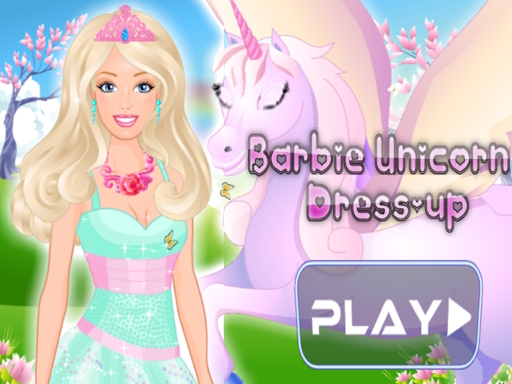
Find the Best Barbie Unicorn Dress-Up Game Online
A well-made unicorn fashion game should load fast and show its controls clearly. Players should spend their time styling instead of hunting through messy menus. Age guidance, device support, and website quality deserve attention too.
Look for More Than Basic Clothing
Choose games with dresses, skirts, tops, capes, shoes, crowns, jewelry, unicorn horns, wings, bows, and stars. A wide wardrobe creates new combinations during every visit. Mix-and-match items are even better when players can change colors, patterns, or shades.
A bigger wardrobe adds replay value without making the rules harder. One day, players might create a royal gown. The next, they can design a relaxed rainbow outfit. Tools that remove one item without clearing the entire character are especially helpful.
Choose Simple, Responsive Controls
Clicking, tapping, dragging, and using menus are easy controls for most players. Clear icons help children find clothing groups without reading long directions. A page that loads quickly keeps attention on the design.
Check that the game works on computers, tablets, and phones. Touch buttons should respond on the first tap, while desktop play should work with a mouse or trackpad. A crowded screen can make a creative game hard to enjoy.
Put Creativity Ahead of Competition
A good dress-up game lets players test ideas without timers, hard stages, or pressure to win. Reset and randomize buttons make experiments easy. When available, save, screenshot, gallery, and share tools allow players to keep favorite designs.
Styling should remain the main activity. Large ads, forced purchases, and complex tasks can distract from the fun. Pick a game that feels calm, open, and simple to control.
Build a Magical Barbie Unicorn Outfit Step by Step
A coordinated character often looks better than one covered in unrelated items. Begin with a basic idea, then add details that fit it. Any piece can be changed later.
Start With a Color Palette That Fits the Unicorn Theme
Choose two or three main colors before selecting every item. Pink and lavender create a gentle princess style, while pastel blue and silver feel cool and dreamy. Rainbow colors suit a lively festival outfit. White and gold give the character a royal look.
Use contrast to draw attention to important details. A deep purple background can make pale clothing stand out. A bright rainbow scene may work better with stronger colors. Link the hair, outfit, horn, and shoes with at least one shared shade.
Match the Dress With Fantasy Accessories
Unicorn horns, wings, clouds, stars, hearts, tiaras, bows, and glitter make the theme easy to recognize. Select one main accessory, then build the outfit around it. Large silver wings, for example, may look best with a simpler lavender dress.
Pair bold pieces with quieter details. A sparkling crown, huge wings, and a heavily patterned gown can compete for attention. When the dress is busy, choose small jewelry and a simpler hairstyle.
Finish With Hair, Shoes, and a Background
Hair can change the character’s mood as much as the dress. Long curls fit a royal or fairy-tale design, while a bright ponytail suits a rainbow concert. Boots work well for an adventure outfit, and jeweled shoes suit a royal party.
Choose a background that fits the character. A cloud kingdom, enchanted forest, or rainbow scene can add context when the game offers background choices. The character’s style should be clear within a few seconds.
Features That Keep a Barbie Unicorn Game Fun
Helpful tools add more options without making the game difficult. They give players new ways to test styles, save designs, and create short stories. Features vary by game, so check the page before expecting a specific tool.
Use Randomize and Reset Tools to Test New Styles
A random outfit button can suggest color matches or clothing combinations you might not pick. It also gives players a starting point when the wardrobe feels overwhelming. Try changing one or two random pieces instead of keeping the full result.
A reset button makes experiments less risky. Players can try an unusual crown or bold shoes without losing a favorite outfit. If the game includes a gallery, download feature, or screenshot tool, save designs worth using again.
Create Themed Looks for Fantasy Scenes
Creative prompts can turn one dress-up session into several small challenges. Try making a rainbow princess, a moonlight unicorn rider, an enchanted forest fairy, a sparkling party guest, or a pastel cloud queen. These are styling ideas, not features included in every game.
Change the colors and main accessory for each scene. A moonlight rider might wear navy and silver with a glowing horn. A cloud queen could use white, pink, and soft blue. Comparing the designs shows how small changes affect the whole character.
Turn Dress-Up Into Storytelling
Give the character a name, a setting, and a reason for the outfit. She might be getting ready for a unicorn festival, exploring a magical kingdom, or attending a royal celebration. The story gives each item a clear purpose.
Story play also works well with siblings and friends. One player can design the character while another selects the setting or event. This creates more interest than choosing items without a shared idea.
Keep Barbie Unicorn Dress-Up Games Online Safe
Online dress-up play should suit the child’s age and the family’s comfort level. Free browser games may include ads, outside links, or sign-up forms. A quick safety check can prevent many problems.
Check the Website Before Playing
Read the site’s privacy policy, age guidance, contact details, and ad rules. Established platforms are often easier to review than pages filled with redirects or unclear ownership details. Keep official Barbie-branded games separate from fan-made projects and unrelated titles.
Leave any page that starts suspicious downloads, shows constant pop-ups, or sends you to unexpected sites. A game should not need an odd browser extension to display its clothing. If the page is confusing before play starts, choose another one.
Watch for Ads, Outside Links, and Purchases
Free games may show banner ads, video ads, or links to other sites. Check whether the game asks for purchases, account details, chat access, or social sharing. Younger children may need an adult nearby when outside pages appear.
Teach players to close unfamiliar pages instead of clicking every bright button. A purchase screen should show the price and item in clear language. No game should pressure children to buy something to complete a basic dress-up activity.
Protect Personal Information and Device Security
Never enter an address, password, school name, photo, payment detail, or full name into an unfamiliar game. Keep the browser, operating system, and security software up to date. Download files only from trusted sources, and avoid unknown extensions.
Adult supervision helps when a game asks for personal details or opens a new site.







Leave a Reply